
How Interactive 3D Is Changing What We Can Do Online
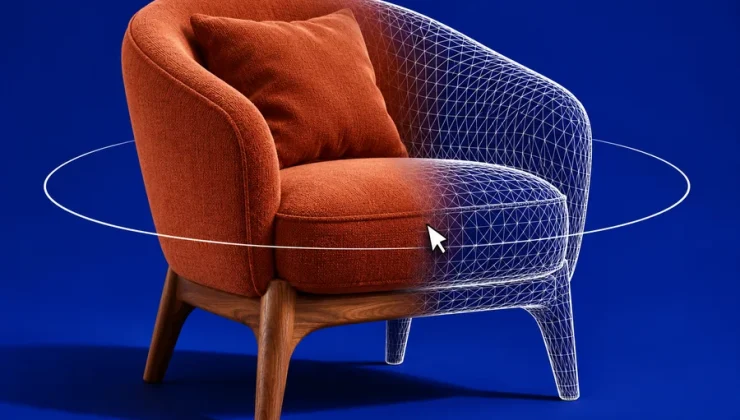
Turning a product to inspect its underside, exploring a room before booking or moving through a game scene gives users control over what they see. Interactive 3D becomes useful when that control helps someone understand a detail, assess a layout or complete an action.
The value depends on what the model reveals and how easily someone can use it. A detailed object that hides the relevant information offers little advantage over a photograph.
Inspecting the Details a Photograph Leaves Out
Consider choosing a desk chair. A front photograph might show the upholstery clearly while hiding the adjustment controls. A model that can be rotated could reveal their position, the shape of the base and the space beneath the armrests.
Before opening a viewer, decide what you need to establish. For a bag, that might be the placement of external pockets. For a speaker, it could be the rear connections. This gives you a reason to explore beyond the first angle.
However, the model is a representation prepared by the seller or its supplier. Missing parts, incorrect proportions and simplified surfaces can affect what it shows.
Shopify’s guidance for checking product models asks merchants to compare their shape with reference photographs, check proportions and materials, and verify scale when previewing them in augmented reality. Those checks explain why a convincing appearance alone is insufficient.
Use written measurements alongside the model. A chair can appear suitable for your desk while having armrests that are too high to fit beneath it. Fabric texture, firmness and comfort also require information that a visual model cannot provide.
What Changed in 2026
In September 2026, Safari 27 extended support for the HTML model element to iPhone, iPad and Mac. This gives websites a browser-supported way to embed interactive 3D objects within a page. The WebKit release notes describe options for model interaction, lighting and fallback content.
Interactive 3D existed online before this release. The update gives developers another way to deliver it, although the experience still depends on the website, browser and device. On an iPad, touch controls matter as much as the model itself. A product viewer should let someone rotate a chair without accidentally scrolling the page, then return to the angle they were inspecting.
Browser games also depend on clear controls, whether they use 2D or 3D graphics. Someone assessing an online casino for iPad can use a game demo, where available, to check how the interface responds to touch. Useful details include whether a hand obscures the balance, how clearly the stake adjustment is separated from the play button, and whether the rules remain easy to open. Trying both portrait and landscape can reveal cramped controls or information that disappears when the layout changes. These checks show how usable the game is on that device, something a promotional screenshot cannot establish.
Safari 27 also introduced website-provided immersive environments on visionOS for Apple Vision Pro. This is a separate capability from viewing and manipulating a model on an iPad screen. A website offering one experience does not automatically support the other.
Understanding What an AR Preview Actually Shows
A 3D viewer displays an object in a digital space. Augmented reality places a representation of that object within a view of your surroundings, usually through a device’s camera.
For furniture, that can help you assess how a shape or colour works in a room. It may also make an awkward placement easier to notice, such as a chair blocking the route between a sofa and a doorway.
Treat this as a visual planning step. Check the product dimensions and measure the available space separately. Include the clearance needed to open drawers, pull out chairs or walk past the item.
Placement is only part of the decision. A model positioned neatly inside a room does not establish whether the delivered product will fit through the entrance or around a narrow staircase. Those measurements belong in the delivery plan.
Exploring a Space Before Visiting It
A room walkthrough can answer questions that separate photographs make difficult to resolve. You might want to understand whether a bathroom opens directly beside the bed or how the entrance connects to the main living area.
Different viewers offer different levels of control. A panoramic photograph lets you look around from a fixed position. A tour may connect several such positions. A navigable 3D reconstruction can allow more freedom to move through the space.
This distinction matters when assessing a hotel room or rental property. Being able to turn the view does not necessarily mean you can move anywhere or measure distances accurately.
Check whether the tour represents the exact room being offered, when it was captured and whether dimensions are provided separately. A walkthrough can clarify layout while leaving questions about noise, maintenance and current furnishings unanswered.
Learning How Parts Fit Together
Interactive models are particularly useful when a question concerns position or movement.
An equipment guide could let a reader rotate a housing to locate a fastening point. An exploded view could separate components to show how they fit together. The reader can inspect the relevant angle without waiting for a video to reach it.
For learning, the model also needs explanation. Labels should identify the parts, and the reader should be able to return to a starting view after rotating the object. If an animation demonstrates movement, controls should allow it to be paused and replayed.
Any simplifications need to be clear. Components separated for visibility may not show their actual working distances. A model may omit small fittings or internal parts to keep the explanation readable.
Before using a visual guide for assembly or repair, check that it matches the exact product version and follow its written instructions.
Choosing the View That Answers Your Question
A detailed model is not always the quickest way to find something out. A labelled photograph may show a connector more clearly. A floor plan may communicate dimensions better. A short video may explain a sequence of movements with less effort.
When using an interactive viewer, check whether it lets you:
- Return to the original viewpoint after moving the object.
- Inspect the relevant detail without losing image clarity.
- Find measurements, labels or instructions alongside the model.
- Switch to photographs or another view if interaction is difficult.
For a purchase, the model should help resolve a specific question about the product. For a lesson, it should make a relationship or movement easier to understand. For a game, the scene should remain readable while the player uses the controls.