
GPT Image 2 Wins By Reducing Creative Friction

The most interesting thing about modern image models is no longer whether they can make something beautiful. Many of them can. The real question is whether they can reduce the friction between idea and usable output. That is where Image to Image becomes a natural way to think about GPT Image 2. This model feels less important as a technical milestone alone and more important as a shift in user experience: fewer broken first drafts, fewer wasted generations, and fewer moments where the creator has to fight the model just to get something directionally right.
That change matters because creative work rarely fails at the idea stage. It usually fails in translation. A user knows what they want, but the model misunderstands tone, loses structure, mangles text, over-stylizes the scene, or ignores the practical purpose of the image. GPT Image 2 looks strong because it appears designed to reduce exactly that gap. Instead of only chasing visual spectacle, it seems built to make image generation feel more cooperative.
Why Friction Is The Better Lens
Most reviews of image models focus on visual quality first. That is understandable, but it is no longer enough. A striking image is easy to admire and hard to evaluate. A low-friction workflow is less dramatic, but often more valuable.
Good Models Waste Less User Intent
The strongest models today are not simply more artistic. They are better at preserving what the user actually meant. That may sound subtle, but it is one of the biggest practical differences between an entertaining model and a dependable one.
When a prompt includes multiple constraints, weaker systems often flatten the request into something generic. GPT Image 2 seems more capable of holding onto layered intent. It handles not just the mood of a scene, but also the structure, communication goals, and formatting expectations around that scene.
Usability Is Now A Competitive Advantage
This is why GPT Image 2 feels notable from a product perspective. It is not only a model upgrade. It is a workflow upgrade. Better text rendering, editing, image input handling, and more disciplined visual organization all reduce the amount of correction the user has to do afterward.
That is a bigger advantage than it sounds. In real use, the best model is often the one that creates the least cleanup.
Where Less Friction Matters Most
This shift becomes especially valuable in tasks like:
- Creating ad concepts with readable headlines
- Turning a rough image into a cleaner campaign draft
- Generating layouts that need both style and structure
- Editing an existing visual without losing its main identity
These are not glamorous edge cases. They are normal creative jobs.

How GPT Image 2 Changes The User Experience
What stands out to me is that GPT Image 2 feels closer to a design-aware assistant than a pure image machine. It still works through prompts and image inputs, but the result seems more responsive to actual production needs.
The Model Feels More Cooperative
A common frustration with older image workflows is that the user must over-explain everything. Even then, the model may still ignore key parts of the request. GPT Image 2 appears better at absorbing nuance without forcing the user into awkward prompt engineering every time.
That does not mean prompting stops mattering. It means the model seems better at meeting the user halfway.
Editing Becomes More Natural
Another important shift is that editing no longer feels secondary. In many earlier image systems, editing worked, but often with a sense of compromise. The result could drift too far from the source image, lose important details, or feel detached from the original intention.
GPT Image 2 appears more comfortable with edits as a first-class use case. That matters because real creative workflows often begin with an existing asset, not a blank page.
Text Handling Improves Practical Confidence
Text rendering deserves special attention because it affects trust. Once a model produces cleaner poster text, clearer signage, more believable labels, and stronger layout typography, users begin to imagine broader applications. The model stops feeling limited to mood boards and starts feeling relevant to marketing, publishing, and product storytelling.
Image Inputs Make The Workflow Smarter
Support for high-fidelity image inputs is another reason the model feels more mature. It allows the user to work from references, sketches, drafts, product shots, or prior assets rather than rebuilding visual context from scratch.
Why This Changes Behavior
When the model can handle image inputs and edits more reliably, users become more willing to experiment. They no longer treat every generation as a gamble. They treat it as a guided step inside a larger creative process.
A Review Through Real Work Instead Of Hype
There is an easy way to overpraise any new model: focus only on its best demos. I think GPT Image 2 is more interesting when viewed through ordinary work instead.
Marketing Work Becomes Faster To Explore
For a marketing team, the value is not only in making one impressive visual. It is in testing multiple directions quickly. A campaign can move from idea to draft with less production drag when the model handles text, editing, and image structure more cleanly.
Design Ideation Gets Better Starting Points
For designers, a better image model is not necessarily a replacement for craft. It is a better first layer. The difference between a weak draft and a strong draft can save a surprising amount of time downstream. GPT Image 2 appears closer to producing material that is genuinely worth refining.
Small Teams Benefit More Than Large Teams
Large teams can often absorb messy workflows because they have specialists for cleanup and iteration. Smaller teams do not have that luxury. They need outputs that are directionally useful much earlier. This is one reason GPT Image 2 may feel disproportionately valuable to lean teams, creators, and operators who do not want to babysit every generation.
Why That Makes This Model More Strategic
A model that saves time is helpful. A model that saves decision fatigue is even better. GPT Image 2 seems to move in that direction by making outputs feel more aligned with the original task.
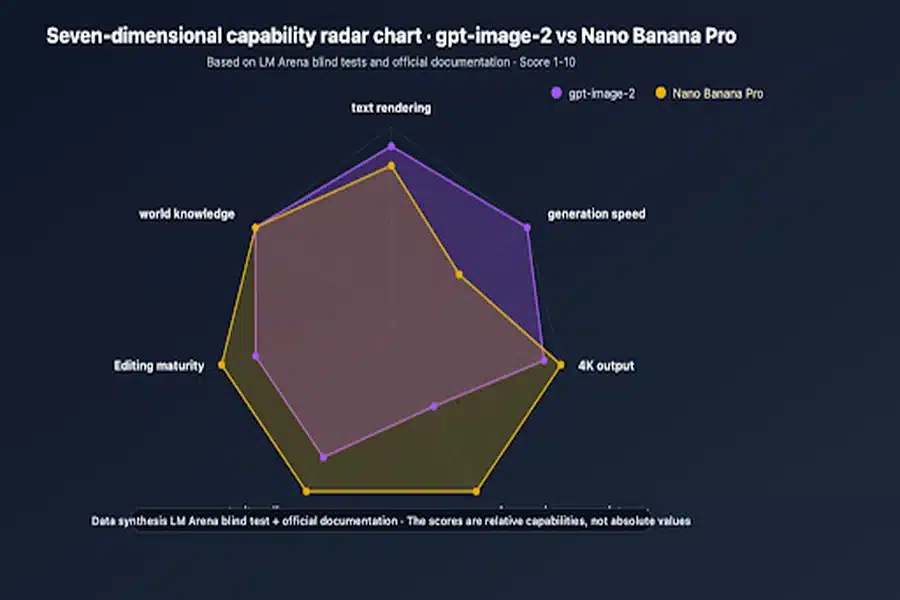
Where GPT Image 2 Looks Strongest
A fair review should identify where the model genuinely seems ahead, not just broadly “better.”
Structured Visual Requests
This is one of its most convincing strengths. GPT Image 2 seems well suited to visual requests that combine image making with communication design, such as posters, editorial compositions, brochure-like layouts, or graphics that depend on readable arrangement.
Multilingual And Global Visual Use
The stronger multilingual positioning also matters. A model that can better support visual work across different scripts and languages is more useful in real global contexts, not just English-first creative work.
Narrative And Multi Element Scenes
The model also appears more capable when the task involves more than one focal point, more than one panel, or more than one layer of meaning. That kind of coherence is hard to fake. When a model keeps a scene organized under complexity, it usually means the system is getting better at more than style.
Editing With Preservation In Mind
Another major strength is that edits appear more likely to preserve what the user actually wanted to keep. That can be more valuable than radical creativity. Many users are not asking for reinvention. They are asking for a controlled transformation.
Why Controlled Transformation Matters More
In commercial work, reliability usually beats surprise. A beautiful but unusable image is still a miss. A controlled, on-brief image is far more valuable.
Where The Model Still Needs Respectful Skepticism
Even a strong model should be reviewed with some restraint.
It Still Depends On Prompt Quality
A better model narrows the gap between weak prompts and acceptable outputs, but it does not erase that gap. Clear direction still matters. If the request is confused, overloaded, or vague, the result may still miss the mark.
Iteration Is Still Part Of The Process
This model may reduce friction, but it does not remove iteration. Complex requests, especially those involving style, typography, editing, and brand consistency at once, may still need multiple passes.
Human Judgment Still Decides Final Quality
No serious team should confuse model strength with final approval. GPT Image 2 appears better at getting close faster, but close is not the same as finished. Taste, review, and context still matter.
Why These Limits Do Not Undercut The Value
In my view, these limitations are acceptable precisely because the model seems stronger at first-pass usefulness. When a model starts closer to the target, iteration feels like refinement instead of repair.
How It Compares On Workflow Value
A useful way to frame GPT Image 2 is not only by output quality, but by what kind of work it reduces.
| Workflow Area | Older Image Model Experience | GPT Image 2 Impression |
| Prompt translation | Often loses nuance | Holds intent more consistently |
| Text heavy visuals | Risky and unreliable | More practical and credible |
| Existing image edits | Can drift too far | Better for guided transformation |
| Structured layouts | Often visually loose | More disciplined and useful |
| Team adoption | Good for experiments | Better for repeatable workflows |
| First pass usefulness | Mixed | Stronger direction from the start |
This is why the model feels more mature. It is not only better at making images. It seems better at reducing the number of things users must fix after the image is made.
My Honest Take From This Angle
From this perspective, GPT Image 2 stands out because it respects the user’s time. That may not sound as dramatic as saying it is revolutionary, but it is more meaningful. The strongest creative tools are not always the ones that create the most shocking demo. They are the ones who quietly remove drag from real work.
That is the angle I find most persuasive here. GPT Image 2 seems powerful because it reduces creative friction across the entire process: understanding the ask, handling image inputs, editing with more control, rendering text more credibly, and producing visuals that feel closer to usable from the start. It still rewards good prompts, still benefits from human review, and still requires iteration in complex cases. But compared with the older pattern of image generation, it feels less like a machine that sometimes gets lucky and more like a system that is starting to understand what creators were trying to do all along.


