
Getting Useful Notes from a Technical PDF with iBoomto
Anyone who has opened a 60-page technical PDF knows the feeling. The abstract is dense, the headings assume you already know the field, and every page seems to introduce three terms you have never seen. Reading it from start to finish is rarely the smartest first move. A better approach is to treat the document as something you map before you read.
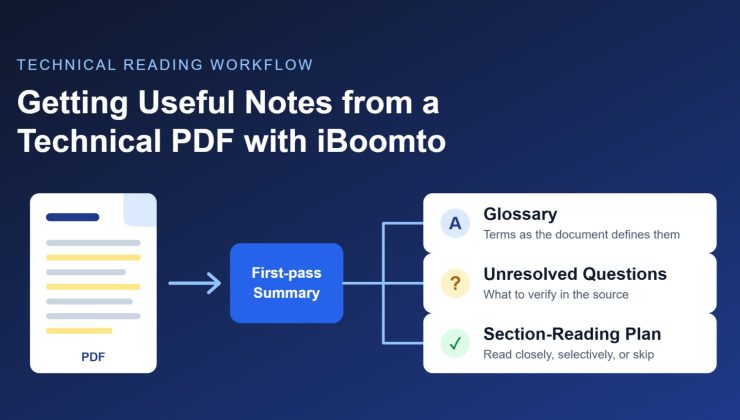
This article walks through a simple workflow: start with a quick summary, then turn it into a glossary, a list of unresolved questions, and a section-reading plan. The result is a set of notes you can actually use, instead of a vague impression of what the document said.
A Quick Word on the Tool
iBoomto is an online platform that offers AI-powered tools for working with documents and everyday digital tasks. For technical reading, the part most relevant here is its PDF summarizing feature, which gives you a fast overview before you commit to the full text. The rest of this workflow is something you do yourself with the output.
Step 1: Use the Summary for Orientation Only
Upload your file to the AI PDF summarizer and read what comes back as a map, not a verdict. A first-pass summary tells you what the document claims to be about, roughly how it is organized, and which topics get the most space. That is valuable, but it is not a substitute for the source.
Keep one rule in mind from the start: every technical conclusion in your notes must point back to a page or section of the original PDF. If the summary says a method “improves accuracy” or a standard “requires encryption,” find the passage that says so. Summaries compress, and compression can drop conditions, exceptions, and numbers. Those are often the details that matter most in technical work.
A practical habit is to write the summary into a notes file and add a column headed “Source location.” Leave it blank at first. Filling it in is the real work, and it turns a loose summary into something verifiable.
Step 2: Build a Glossary from What You Don’t Know
Scan the summary for terms that feel unfamiliar or that the document seems to use in a specific way. Technical papers often give common words narrow meanings. “Latency,” “node,” or “baseline” can mean different things depending on the field, so do not rely on your general understanding.
For each term, record three things:
- The term as it appears in the document
- The definition the document gives, or a note that none is given
- The page where it first appears
If the PDF has its own glossary or a “definitions” section, use that wording first. If it doesn’t, search the document for the first use of the term and read the surrounding paragraph. Only after that should you consult outside references, and when you do, mark those entries as external so you never confuse them with the author’s definition.
A glossary built this way is short, usually twenty terms or fewer, and it makes every later reading session faster. You stop stopping.
Step 3: Write Down What Remains Unresolved
This is the step most people skip, and it is the one that separates real understanding from the feeling of understanding. After reading the summary and building the glossary, list the questions you cannot yet answer. Good examples include:
- What data or conditions did the authors use to support their main claim?
- Does a stated limitation apply to my use case?
- Which figures or tables does the argument depend on?
- Where does the document say “see Section 5” without explaining the reasoning here?
Be specific. “I don’t understand the methodology” is not useful. “I don’t understand why the authors chose this sample size” is, because it tells you exactly where to look.
Number each question and leave space beside it. As you read, you will answer some and discover new ones. Questions that survive the full read are often the most valuable output of the whole exercise, since they show you what to verify, ask a colleague, or test yourself.
Step 4: Turn the Summary into a Section-Reading Plan
Now use everything above to decide what to read and in what order. A technical PDF rarely deserves equal attention on every page. Build a plan with three tiers:
- Read closely. Sections that directly answer your unresolved questions, such as the methods, results, or specifications you actually need.
- Read selectively. Background and related-work sections. Skim headings and first sentences, and stop when you hit something relevant to a glossary term.
- Skip or defer. Appendices, extended proofs, and material outside your purpose, unless a question sends you there later.
Next to each section, write one line stating why you are reading it. For example: “Section 4.2, to check how the test conditions differ from ours.” A reason attached to each section keeps you from drifting into pages that feel important but do not serve your goal.
Estimate time too. A 25-minute block on the results section is easier to start than an open-ended “finish the report.”
Keeping Your Notes Honest
Tools can speed up orientation, but the discipline is yours. Before you call your notes finished, run a short check:
- Does every factual claim have a page or section reference?
- Are numbers, units, and conditions copied exactly as written?
- Have you separated what the document says from what you infer?
- Are outside definitions labeled as outside?
If a statement fails any of these, either trace it to the source or mark it as unconfirmed. This small habit protects you from repeating an error in a report, a presentation, or a decision.
Final Thoughts
A technical PDF becomes manageable once you stop trying to absorb it in one pass. Start with a quick summary for orientation, build a glossary from the terms that slow you down, keep a visible list of unresolved questions, and plan your reading by purpose rather than page order. The outcome is a compact set of notes that you understand, can defend, and can check against the original.