
Boost Productivity with a Multi-Monitor Arm: Why Australian Workplaces Are Upgrading
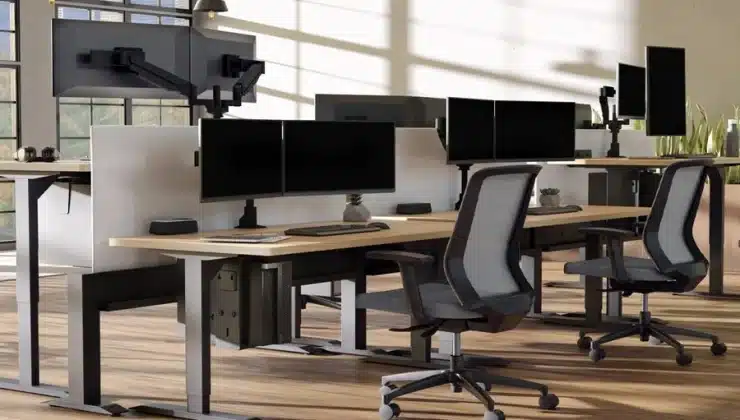
For years, multiple monitor setups were seen as the domain of graphic designers, programmers, and gamers. Today, however, they have entered the mainstream office. From finance to marketing, more employees are working across two or more screens to manage complex workflows. Yet, simply placing monitors side by side on a desk is far from ideal. That’s where a multi monitor arm makes the difference — improving ergonomics, efficiency, and even office aesthetics.
This article explores why Australian businesses are increasingly adopting multi monitor arms, how they enhance productivity, and what to consider when choosing the right setup.
The Rise of Multi-Monitor Workstations
The shift towards hybrid and digital-first work has accelerated the demand for better screen management. A single laptop display no longer suffices for tasks that require constant reference to data, documents, or communication platforms.
Research from Jon Peddie Associates found that dual or triple monitor setups can boost productivity by as much as 42%, as employees spend less time switching between tabs and more time focused on actual tasks. For Australian businesses where efficiency and competitiveness are paramount, investing in multi-monitor solutions is becoming less of a luxury and more of a necessity.
The Productivity Advantage
One of the clearest benefits of a multi monitor arm is improved productivity. Instead of juggling windows or minimising applications, workers can dedicate one screen to communication platforms such as Microsoft Teams, another to spreadsheets or design tools, and a third to analytics dashboards.
This streamlined workflow not only saves time but reduces cognitive load. By spreading tasks across multiple screens, employees are better able to manage complex projects, respond quickly to emails, and collaborate in real time without disrupting their core work.
Ergonomic Benefits: Protecting Employee Health
The workplace health implications are equally important. Poor screen placement is one of the biggest causes of neck strain, shoulder pain, and eye fatigue. Multi monitor arms allow users to:
- Adjust monitor height to align with natural eye level.
- Tilt and swivel screens for optimal viewing angles.
- Maintain proper posture, reducing the need to twist or hunch.
For businesses mindful of their Work Health and Safety obligations, the adoption of ergonomic solutions like monitor arms isn’t just about comfort — it’s about compliance and reducing the risk of long-term injury.
Case Study: An Australian Finance Firm
A Sydney-based finance company recently upgraded its workstations to dual-screen setups supported by monitor arms. Staff were previously working with laptops connected to desktop monitors, often stacking them on books or makeshift stands.
After switching to proper multi monitor arm configurations, the firm reported:
- A 30% faster turnaround on client reports.
- Improved posture and fewer complaints of neck pain from staff.
- A cleaner, more professional appearance in offices used for client meetings.
The modest investment in ergonomic equipment produced measurable returns in both staff wellbeing and productivity.
Space and Aesthetic Advantages
Cluttered desks are more than an annoyance — they can reduce focus and productivity. A multi monitor arm elevates screens off the desk, freeing up valuable workspace for documents, peripherals, or simply a cleaner, more organised environment.
Cable management is another underrated benefit. Modern monitor arms are designed with channels to conceal wires, creating a streamlined look that projects professionalism to both employees and visiting clients.
Dual vs Triple vs Quad Monitor Arms
Not every role requires the same number of screens. Choosing the right arm depends on the work being done:
- Dual Arms – Ideal for general office use, combining email/communication on one screen and core tasks on another.
- Triple Arms – Perfect for data-heavy roles such as analysts, developers, or designers juggling multiple tools.
- Quad Arms – Suited for control rooms, stock traders, or highly technical environments where multiple streams of information must be monitored simultaneously.
By tailoring the setup to staff needs, businesses can avoid over-investment while still gaining the benefits of multi-monitor efficiency.
Cost vs Long-Term Value
At first glance, businesses might hesitate at the additional cost of installing multi monitor arms across departments. However, the return on investment is clear:
- Reduced absenteeism from neck and back strain.
- Fewer workstation upgrades — arms are adjustable and adaptable to new monitor sizes.
- Boosted productivity across staff who rely heavily on digital workflows.
For growing SMEs as well as large organisations, the financial case for monitor arms strengthens with every year of use.
The Australian Context: Hybrid Work and Compliance
With hybrid work now embedded in Australian business culture, employees are often splitting time between home and office. This makes adaptable equipment even more valuable. A well-chosen monitor arm ensures consistency across both environments, helping staff maintain healthy habits no matter where they work.
Furthermore, organisations are increasingly conscious of their obligations under Safe Work Australia guidelines. Providing ergonomic furniture and accessories is part of reducing risk and supporting employee wellbeing — a legal and ethical priority for every employer.
The Future of Workplace Ergonomics
Looking ahead, monitor arms are expected to become even more sophisticated. Innovations include gas-spring assisted movement for effortless repositioning, integrated docking stations, and arms designed for ultra-wide or curved monitors.
As technology evolves, the need to accommodate multiple displays will only grow. Investing in multi-monitor arms today ensures workplaces remain agile, compliant, and attractive to employees seeking modern, flexible conditions.
Final Thoughts
The move towards multi-monitor setups reflects a broader trend in workplace evolution — one where productivity, ergonomics, and aesthetics converge. A multi monitor arm is more than a piece of office equipment; it’s an investment in efficiency, staff wellbeing, and the professional image of a business.
For Australian organisations competing in a digital-first economy, the question is no longer if multi monitor arms are worth it, but how soon they can be integrated into every workstation.


