
AI Trending Video 2025: Trends & How to Create Viral Content
AI Trending Video is changing the way content grows in popularity in 2025. Scroll through TikTok or YouTube Shorts and you’ll see it–faster edits, smarter captions, even full AI-made clips.
Think of a student turning notes into a quick explanation, a gamer posting AI-edited highlights, or a traveler sharing a video in ten languages. That’s how wide the impact already is.
For creators of all kinds, these tools lower the barrier to making videos that can truly go viral. In this article, we’ll look at the five key AI video trends shaping 2025 and how Topview can help bring them to life.
5 Key AI Video Trends in 2025
1. Creating Videos from Text Prompts
AI video generators like Runway and Pika Labs let anyone turn a short description into a video. For example, a travel creator can type “sunset over a mountain lake with soft music” and get a ready-made clip in minutes.
This trend changes the workflow for creators. Instead of spending hours shooting and editing, you can test multiple ideas quickly and post more content consistently. It also encourages experimentation—trying out concepts that might have felt too complicated or expensive to produce before.
Why it matters: Faster creation means more chances to catch a trend early and reach viewers before content saturation.
2. Smarter Video Recommendations
Algorithms on platforms like TikTok and YouTube Shorts now track tiny user behaviors—how long someone watches, whether they replay a clip, or even how they swipe. These signals determine which videos are recommended.
For creators, this means videos can be optimized for engagement. For example, a 10-second cooking tip may perform better if the AI detects that viewers lose interest after 6 seconds. Creators can adjust pacing, text placement, or visuals based on AI insights, increasing the likelihood of trending.
Why it matters: Understanding algorithm-driven trends allows creators to design content that reaches the right audience faster.
3. AI Avatars as Digital Hosts
AI avatars are gaining popularity as alternatives to photographing yourself. Tools like Synthesia and Topview can create lifelike presenters that speak multiple languages and maintain consistent style.
A teacher can explain complex topics without repeating them. A small business can showcase products using a virtual spokesperson across markets. This reduces production time and ensures that messaging stays consistent across videos.
Why it matters: Avatars allow creators to expand content output and maintain quality without additional filming resources.
4. Automatic Subtitles and Translation
Language is no longer a barrier to trending videos. AI can automatically generate subtitles and translate content into multiple languages.
A gamer streaming in English can quickly add Japanese subtitles and a Spanish voiceover. A creator making DIY tutorials can reach audiences worldwide without additional recording or editing.
This feature also improves accessibility, allowing viewers who are hearing impaired or in noisy environments to fully engage with the content.
Why it matters: Multi-language support dramatically expands potential viewers, increasing the chance for global virality.
5. AI Suggests What Content Will Trend
Some AI platforms analyze social media trends, search queries, and audience engagement patterns to predict which topics are likely to gain traction.
For example, an AI tool might identify 10-second snack hacks or micro-tutorials that are gaining momentum. Creators can then plan content in advance and adapt formats that resonate with viewers.
Regular use of these insights allows creators to anticipate shifts in audience interest, rather than react after a trend has peaked, giving them a strategic advantage.
Why it matters: Leveraging AI insights for content planning helps creators focus on ideas with the highest potential, reducing trial and error.
Topview: A Powerful Tool for AI-Driven Trending Videos
As AI video trends take off, creators need tools that can quickly turn ideas into compelling clips. Topview fits perfectly into this space. It’s an AI platform that transforms simple images, product links, or text prompts into polished videos featuring lifelike AI avatars.
Here’s what makes it a powerful choice for anyone looking to create AI Trending Videos:
- AI-Powered Script and Idea Generation: Topview has analyzed over 5 million viral videos from TikTok and YouTube. It extracts successful patterns to automatically generate scripts, visuals, and even voiceovers, helping creators produce content that aligns with trending formats.
- Hyper-Realistic AI Avatars: The platform offers more than 1,000 avatars capable of natural speech, gestures, and emotional expressions. You can also create a custom avatar from your own photo, making your videos feel personal and professional.
- Multi-Language Support: With support for 30+ languages, you can localize videos for global audiences without additional recording or editing work.
- Simplified Editing Interface: A slide-based editor automatically handles transitions, subtitles, background music, and effects, allowing creators to produce polished videos in minutes.
- Integration with E-Commerce Platforms: For product-focused videos, Topview can pull images and descriptions directly from Shopify, Amazon, and other platforms, making it faster to create marketing content.
Topview enables creators—whether solo vloggers, educators, or small businesses—to produce professional AI Trending Videos quickly and cost-effectively.
Here’s a simple way to create an AI Trending Video using Topview:
Step 1: Start a New Video Project
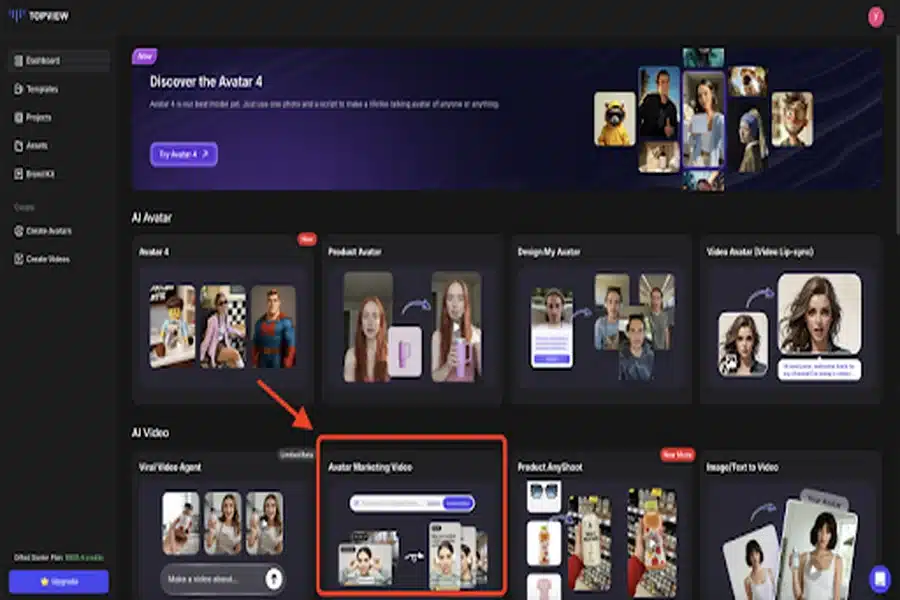
Log in to Topview and click “Avatar Marketing Video” on the dashboard. Name your project and choose a format—square, vertical, or widescreen.
Step 2: Add Your Content
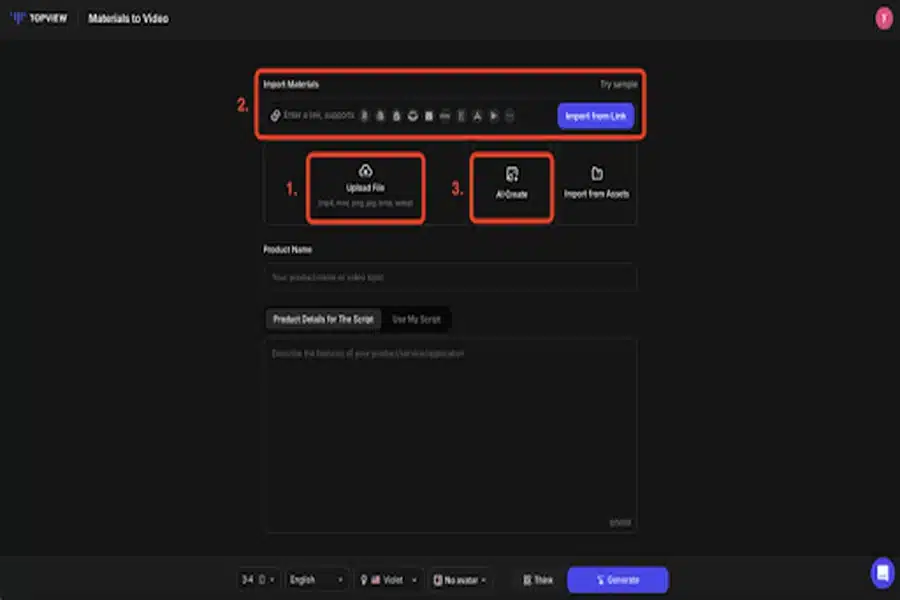
Upload images or video clips, paste a product link, or enter a short text prompt. Topview will automatically generate video elements based on your input, including visuals, AI avatars, and suggested scripts.
Step 3: Customize and Generate
Select a style or theme, select an AI voice (or upload your own), and add an avatar if you want. Click “Generate” to let Topview create a draft video.
Step 4: Edit and Export
Refine your script, adjust visuals, add subtitles, background music, or branding elements using the drag-and-drop editor. When you’re happy with the result, export and download the video.
Topview’s combination of realistic avatars, multilingual support, and automatic editing makes it one of the most powerful tools available to turn ideas into viral content in 2025.
Conclusion
Video in 2025 looks different than ever before, and much of that change comes from AI. With trends like avatars, auto-editing, and multilingual content, AI Trending Videos are opening new doors for creators and brands alike.
Tools like Topview make it easy to join this shift, turning simple ideas into scroll-stopping clips in minutes. Now is the time to test, create, and let AI help your content reach a larger audience.


