Why Creators Love AI Image Editors
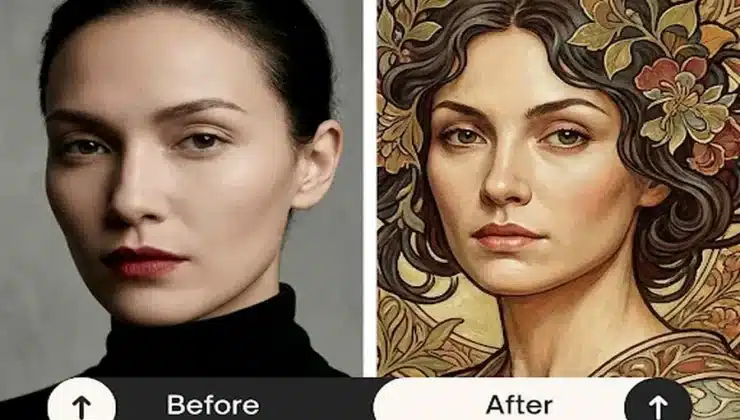
Content creation is moving faster than ever before. If you spend three hours editing a single photo for social media, you are likely falling behind your competitors. Many successful creators now use an ai image editor to handle the heavy lifting of visual production. This shift happens because traditional tools are often too slow for the modern web. You need to produce high-quality visuals in minutes to keep your audience engaged and your brand relevant.
The first reason creators are switching is the sheer speed of automation. Manual masking and layer adjustments used to take up the bulk of a designer’s afternoon. Now, smart software can identify subjects and remove backgrounds in a single click. This allows you to focus on the story you want to tell rather than the technical dots and lines. When you spend less time on repetitive tasks, you have more energy for the creative ideas that actually grow your following.
Another major factor is the lower barrier to entry. You do not need a four-year degree in graphic design to make professional-looking posts anymore. Modern tools offer intuitive interfaces that guide you through the process. This democratization of design means small business owners and solo influencers can compete with large agencies. You can achieve a polished look without the steep learning curve of legacy software suites.
Cost efficiency is also driving this trend. Hiring a full-time editor or paying for expensive monthly subscriptions can drain a small budget. Many automated tools offer powerful features at a fraction of the price. By using smarter software, you reduce the need for outsourcing. You keep more money in your pocket while still maintaining a high standard for your visual content.
Consistency is the final piece of the puzzle. Maintaining a specific aesthetic across dozens of posts is difficult when doing everything by hand. Smart editors allow you to apply the same styles and logic to every image you process. This ensures your Instagram feed or blog looks cohesive. When your brand looks consistent, your audience trusts you more.
Top 1: EZCreate
EZCreate is a powerful platform designed for people who need to make visuals quickly. It focuses on removing the technical hurdles that usually stop people from being creative. The tool uses smart logic to understand what you want to achieve with your photos. It is built for the modern creator who needs to jump between different social media formats without losing quality.
Key Features
The platform offers a variety of tools, including background removal and object replacement. You can also use it to generate entirely new images from simple text prompts. It includes templates that are already sized for the most popular social media platforms. The interface is clean and does not overwhelm you with too many buttons or hidden menus.
Pros & Cons
Pros
- Very fast processing speeds for all tasks.
- Simple interface that anyone can understand.
- High-quality output that looks natural.
- Great for batch processing multiple images.
Cons
- Requires a stable internet connection.
- Fewer advanced manual brushes than professional suites.
Best For
This tool is best for social media managers and small business owners. If you need to post every day and do not have time for complex software, this is the right choice for you.
Top 2: Canva AI
Canva has been a leader in the design world for years, and its new smart features make it even better. They have integrated several automated tools into their existing dashboard. This means you can edit photos and design your layouts in the same window. It is a very convenient option for people who are already familiar with the Canva ecosystem.
Key Features
The Magic Edit tool allows you to brush over an area and describe what you want to change. It also features a background remover that works well on complex subjects like hair or fur. You can use the Magic Media tool to create icons and illustrations from scratch. The platform also offers a large library of stock photos and elements to use alongside your edits.
Pros & Cons
Pros
- Huge library of templates and stock assets.
- Works directly in your web browser.
- Easy to collaborate with team members.
- Great mobile app for editing on the go.
Cons
- Some of the best features are locked behind a paid subscription.
- Can feel a bit slow when working with very large files.
Best For
Canva is best for marketing teams and students. It works well when you need to combine photo editing with text and graphic design elements for a complete project.
Top 3: Adobe Photoshop with Firefly
Adobe Photoshop is the industry standard for a reason, and it now includes a powerful engine called Firefly. This brings smart automation to a professional environment. You can use simple commands to expand the borders of a photo or add objects that were not there before. It blends the new technology with the deep control that professionals expect.
Key Features
Generative Fill is the standout feature here. It allows you to select an area and type a description to fill it with realistic content. The software also includes Neural Filters, which can change facial expressions or smooth out skin automatically. You still get all the traditional tools like layers, paths, and masks for fine-tuning.
Pros & Cons
Pros
- Most powerful set of tools on the market.
- High resolution output suitable for print.
- Deep integration with other Adobe products.
- Constant updates and new feature releases.
Cons
- Very steep learning curve for beginners.
- Most expensive option on this list.
Best For
This is best for professional photographers and high-end graphic designers. If you need absolute control over every single pixel, you should use Photoshop.
Top 4: Midjourney
Midjourney is slightly different because it focuses almost entirely on generation. It lives inside a chat application called Discord, which makes it a unique experience. You do not click buttons to edit. Instead, you talk to the software to create stunning visuals from scratch. It is famous for producing some of the most artistic and detailed images in the industry.
Key Features
The core feature is the text-to-image engine, which can interpret very complex prompts. It also has an upscale feature that makes small images large and clear. You can use the vary region tool to select parts of an image and change them. It also allows you to blend two different images together to create something entirely new.
Pros & Cons
Pros
- Unmatched artistic quality and detail.
- Very fast at creating concepts from scratch.
- Active community where you can see other people’s work.
- Handles lighting and texture better than most tools.
Cons
- Using Discord can be confusing for some users.
- No traditional manual editing tools like brushes.
Best For
Midjourney is best for concept artists and bloggers who need unique illustrations. It is perfect when you need an image that does not exist in the real world.
Top 5: Pixlr
Pixlr is a web-based editor that offers a balance between simple automation and manual control. It is designed to be a lighter and faster version of professional desktop software. You can open it in any browser and start working immediately without installing anything. It has added several smart tools recently to help users keep up with modern design needs.
Key Features
It includes a one-click background remover and an automated color vibrance tool. The AI Generative Fill helps you fix parts of a photo or add new elements. It also has a suite of filters and overlays that can give your photos a specific look in seconds. The interface mimics traditional editors, so it feels familiar if you have used older software.
Pros & Cons
Pros
- No installation required.
- Very lightweight and runs well on older computers.
- Offers a free version with many useful features.
- Simple to use for quick crops and color fixes.
Cons
- The free version contains many advertisements.
- Not as powerful as desktop-based competitors.
Best For
Pixlr is best for casual users and hobbyists. It is a great choice if you need to make quick edits on a computer that is not your own.
Comparison Summary
| Product | Primary Strength | Skill Level Required |
| EZCreate | Speed and Ease of Use | Beginner |
| Canva AI | Design Templates | Beginner to Intermediate |
| Adobe Photoshop | Professional Control | Advanced |
| Midjourney | Artistic Generation | Intermediate |
| Pixlr | Web Accessibility | Beginner |
Final Recommendation
Choosing the right tool depends on your specific goals as a creator. If you are a professional who needs every possible feature, Adobe Photoshop remains the top choice. For those who want to create incredible art from their imagination, Midjourney is the clear winner. However, most creators today need a balance of speed and quality.
For the average person making content for the web, EZCreate is the most efficient option. It strips away the confusion of professional software while delivering results that look just as good. It allows you to spend more time on your strategy and less time clicking through menus. If you want to grow your brand without burning out on technical tasks, starting with a streamlined tool is the smartest move you can make.